drom2psl
drom2psl is a helper tool of FVM that converts wavedrom waveforms, in JSON
format, into PSL files that include sequences and (depending on the number of
sequences defined in the JSON file) properties.
In order for this helper tool to have maximum usefulnes, we are assuming a number of things in the input .json files:
That the clock is the first signal that appears in the JSON description
That only the clock carries the repeat zero-or-more symbol, which is represented by
|in the JSON file and by two curved lines in the generated.svgfile. When the clock signal has this value, that means that the specific values of the other signals repeat for zero or more clock cycles. This can be combined with standard clock signal values to create other repetition patterns such as ‘1 or more’, ‘2 or more’, etc.That the user has defined the datatype of any ‘data’ in a ‘type’ field in the wavelane, for example:
{name: 'dat', wave: 'x.3x', data: 'data', type: 'std_ulogic_vector(31 downto 0)'},
It must be noted that, while the
typefield is not considered by wavedrom, it is compatible with it, meaning that JSON files that include this field can rendered by wavedrom normally.
That each top-level signal group is being used to group signals that take part in the same sequence. So, every top-level group defines a sequence. If there are no toplevel groups, a single sequence will be defined that includes all the signals.
That, if we have exactly two top-level groups, then we are describing some relation between two sequences and thus a sample property will be generated in the PSL file relating the two sequences. For this:
If the first group is called
Precondand the secondCond, the property will relate the two sequences using the overlapping implication operator,|->.If the first group is called
Precondand the secondCond_non_overlap, the property will relate the two sequences using the non-overlapping implication operator,|=>.Else, the property will relate the sequences using the “both must happen at the same time and last exactly the same number of cycles” operator,
&&.
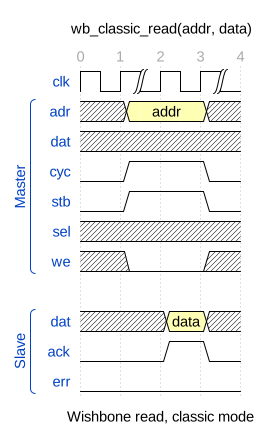
For example, the following waveform is compliant with the aforementioned assumptions, and defines two signal groups, Master and Slave:
The following subsections explain the three ways in which the drom2psl tool
can be used:
Adding drom sources
The functions fvm.FvmFramework.add_drom_source() and
fvm.FvmFramework.add_drom_sources() allow to respectively add
one or multiple wavedrom sources, in JSON format, to an FVM project.
This is the recommended way of working with wavedrom sources if no modifications are needed on the generated PSL outputs.
During the setup stage of the FVM framework, all the drom sources will be
converted to PSL files, which will be included in the generated scripts for the
prove step.
- fvm.FvmFramework.add_drom_source(self, src, flavor, library='work')
Add a single Wavedrom source file to the framework.
This method validates that the provided file exists and checks whether it has a typical Wavedrom extension (
.json,.JSON,.drom, or.wavedrom). If the file does not exist, the framework logs an error and exits. If the extension is unusual, a warning is logged. The flavor parameter must be either “vhdl” or “verilog”.Warning
Verilog flavor is not available yet when using Wavedrom sources.
The library parameter specifies the library to which the PSL source belongs, i.e., the library where the design bound to the PSL properties is located.
Libraries have to be specified in the order they want to be compiled. For example, if library A depends on library B, then B must be added before A. The order of the source files within each library is not significant.
- Parameters:
src (str) – Path to the Wavedrom source file.
flavor (str) – Flavor of PSL, either “vhdl” or “verilog”.
library (str) – Library of the design bound to the PSL properties. Defaults to
"work".
- fvm.FvmFramework.add_drom_sources(self, globstr, flavor, library='work')
Add multiple Wavedrom source files to the framework using a glob pattern.
This method searches for all files matching the provided glob pattern and adds them as Wavedrom sources. Each matching file is added via
add_drom_source(). If no files match the pattern, an error is logged and the framework exits. The flavor parameter must be either “vhdl” or “verilog”.Warning
Verilog flavor is not available yet when using Wavedrom sources.
The library parameter specifies the library to which the PSL source belongs, i.e., the library where the design bound to the PSL properties is located.
Libraries have to be specified in the order they want to be compiled. For example, if library A depends on library B, then B must be added before A. The order of the source files within each library is not significant.
- Parameters:
src (str) – Path to the Wavedrom source file.
flavor (str) – Flavor of PSL, either “vhdl” or “verilog”.
library (str) – Library of the design bound to the PSL properties. Defaults to
"work".
Manually running drom2psl
Alternatively, the user can just run the drom2psl executable to:
Generate PSL sequences from .json wavedrom descriptions.
usage: drom2psl [-h] [--outdir OUTDIR] [-d] [-t] [-q]
                inputfiles [inputfiles ...]
Positional Arguments
- inputfiles
.json input file(s) (must be wavedrom compatible)
Named Arguments
- --outdir
Output directory for generated files. By default, outputs are generated in the same directories where the input files are.
- -d, --debug
Show debug messages. (default: False)
Default:
False- -t, --traverse
Traverse the wavedrom file, printing even more debug information. (default: False)
Default:
False- -q, --quiet_psl
Do not include extra comments in generated PSL files. (default: False)
Default:
False
Calling the drom2psl.generator function
The third way of invoking drom2psl is by calling the
fvm.drom2psl.generator.generator() function from any python
script:
- fvm.drom2psl.generator.generator(filename, outdir=None, verbose_psl=True, debug=False, do_traverse=False)[source]
Actually generate the PSL file with the sequences
- Parameters:
filename (string) – input wavedrom file (JSON)
outdir (string) – output directory (if not specified, each .psl file will be generated in the same directory of each input file)
verbose_psl (bool) – add extra comments to generated psl file
debug (bool) – print debug messages
do_traverse (bool) – traverse the wavedrom file, printing structural debug information
- Returns:
0 if no errors detected, 1 if errors were detected, 2 if the dict extracted from the json file was empty
- Return type:
int